

Nue.js ... markdown with mega powes
First impressions ...
Disclaimer, I'm only reviewing version 0.3.1, meaning actual behaviour might be different by the time you read this article.
(✓ Nue 0.3.1 • Bun 1.0.22)
(i'm updating this list in realtime while I'm working and hit any issues. My feedback is going to be random, all over the show as I find I need something and then dive into the documentation to find out how to do it the Nue
way. I'll clean this up more in a few days with a final review.)
(I've just completed the draft of my early impressions, I'm posting this to linkedin as-is, and will refactor this next, convert to sematic <sections/> and CSS, that will make the list a lot easier to read.)
Excellent documentation
Documentation is excellent, well written.
Docs are refreshingly light. I was able to literally read ALL the documentation from beginning to end, and understand all of it, without getting information overload.
Many other platforms you can't read and understand it all straight away, not in a few hours. You typically have to build multiple different spike projects to understand all the different concepts. Granted, I do still need to complete the sections for building SPA's and data islands, so that's been covered.
A few things here and there are not complete, but not much.
There was enough for me to evaluate the risks of using a new framework instead of using something established like Astro or Hugo.
There are some small gaps between the getting started build a blog tutorial. But honestly, I found having to dig in and do more reading to fill in the gaps myself was very educational. If I have been totally spoon fed every single step I would have learnt less.
improvements?
I would like to either have a search, or have a way to toggle to navigate the docs in one single long page, so that i can simply use browser Cmd+F to find something.
When I first started using Nue, I found myself coming back and hunting for stuff I had read and having to click through many pages each time to find what I'm looking for.
Maybe better description for beginners of how to get tabs working? (I know it's simply a case of applying appropriate stying to selected and non selected elements, but beginners will not see that.)
more serious problems;
No documentation on how to add Google Analytics to the blog you just created in the tutorial.
Adding GA script to the
<head>Just crashes withunexpected tokenerror. I assume the only way to do it on version0.3.1, is to manually create the entire page layout yourself, which totally defeats the purpose of using a markdown engine. I assume that this will be sorted in later releases.I tried making a
componentfor the GA code, but that resulted in different errors.I will raise this as a issue on github, but including the negative feedback here, because it's so far the only negative I could find, and I'm concerned my review is not balanced. 😆
I know this will probably be resolved quickly, but, here for completeness.
For now, the workaround is to drop in your own root as described here; bit fiddly, I know, but I assume only temporary.
Update: I tried to follow the above workaround notes to define your own root and got a host of other errors, and I had to eventually give up. Running out of time. I can probably write a cloudflare plugin to do this for me, but I can see this being a deal breaker for a lot of people trying it out to use for their blog, so hopefully this is natively supported soon.
Error messages dont provide any help in current version : below is the error message I recieved when I tried to follow the instructions above using my own
<html>root.
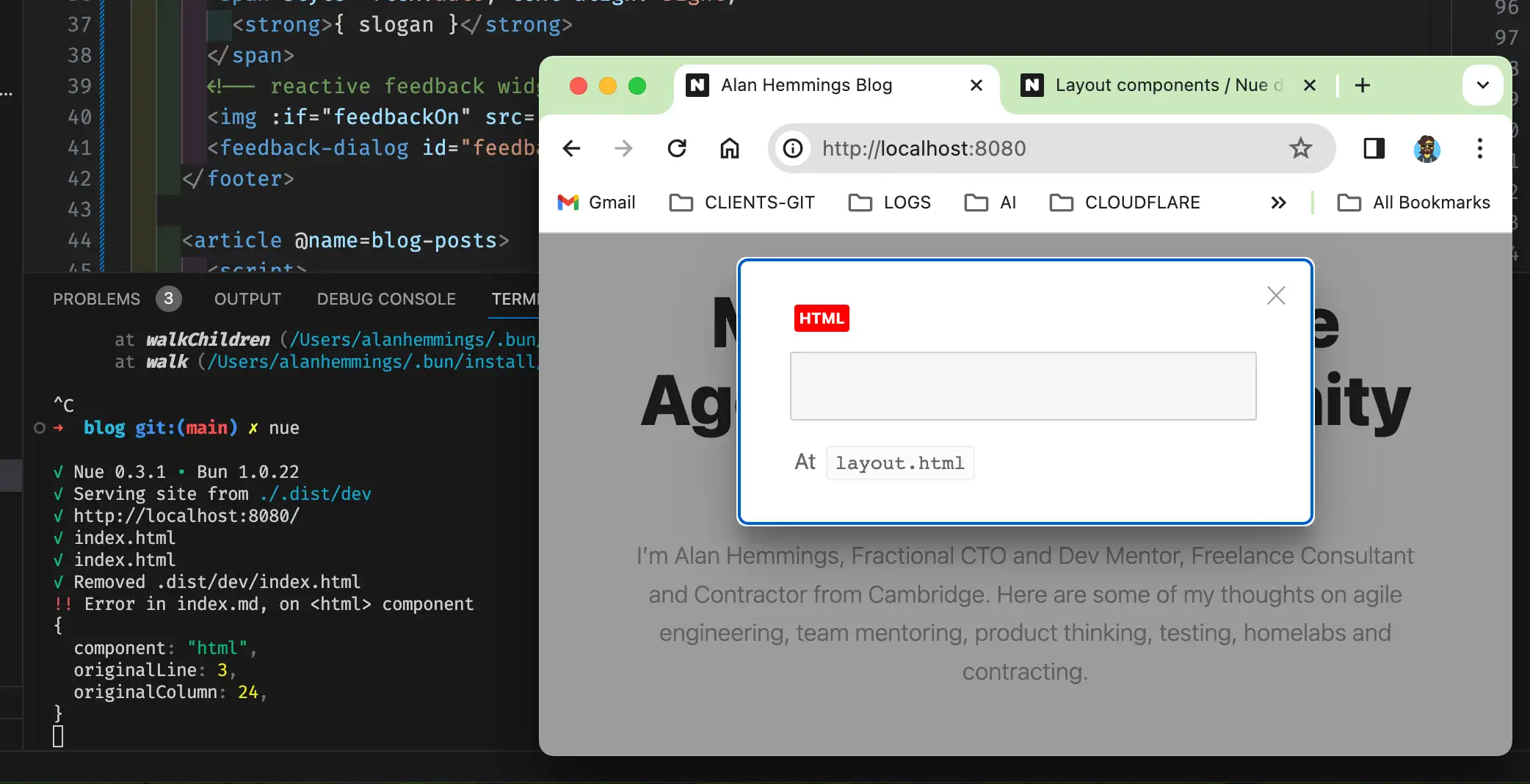
Images in bullet lists don't appear to be supported, just gets' rendered as encoded markdown instead of being transformed :
[! /img/p/build-settings.png]
Semantic design is contageous
I'm big fan of TailwindCSS, and I was really really sorely tempted to hack the layout.html files to add tailwind to my project
... I didnt, and now that Nue 100% seperates the content from presentation, as well as support simple custom controls for markdown, almost all of the problems that Tailwind solves melts away and it's been an absolute pleasure writing clean CSS on clean semantic html.
Encourages shipping fast and iterating
I was able to deploy a rudimentary site within minutes on top of cloudflare pages
I had my first site live with a new subdomain, in less than an hour after first seeing Nuejs
Basic site, just content and headings
Add some basic styling in css files
Refactor and remove duplication
Refactor again and make it more semantic. (i.e. use native HTML5 elements)
After shipping my first site, (live), I was able to take concepts I'd learnt and iteratively improve the site.
Markdown files can have raw html and style blocks dropped straight into the markdown. This is rendered as-if without encoding, allowing me to rapidly prototype using my current skills and slowly adopt the idiomatic
Nue
way removing bits of hard coded html and css as I grok'd what I was reading.
Hosting using Cloudflare pages with a fake 'makefile'

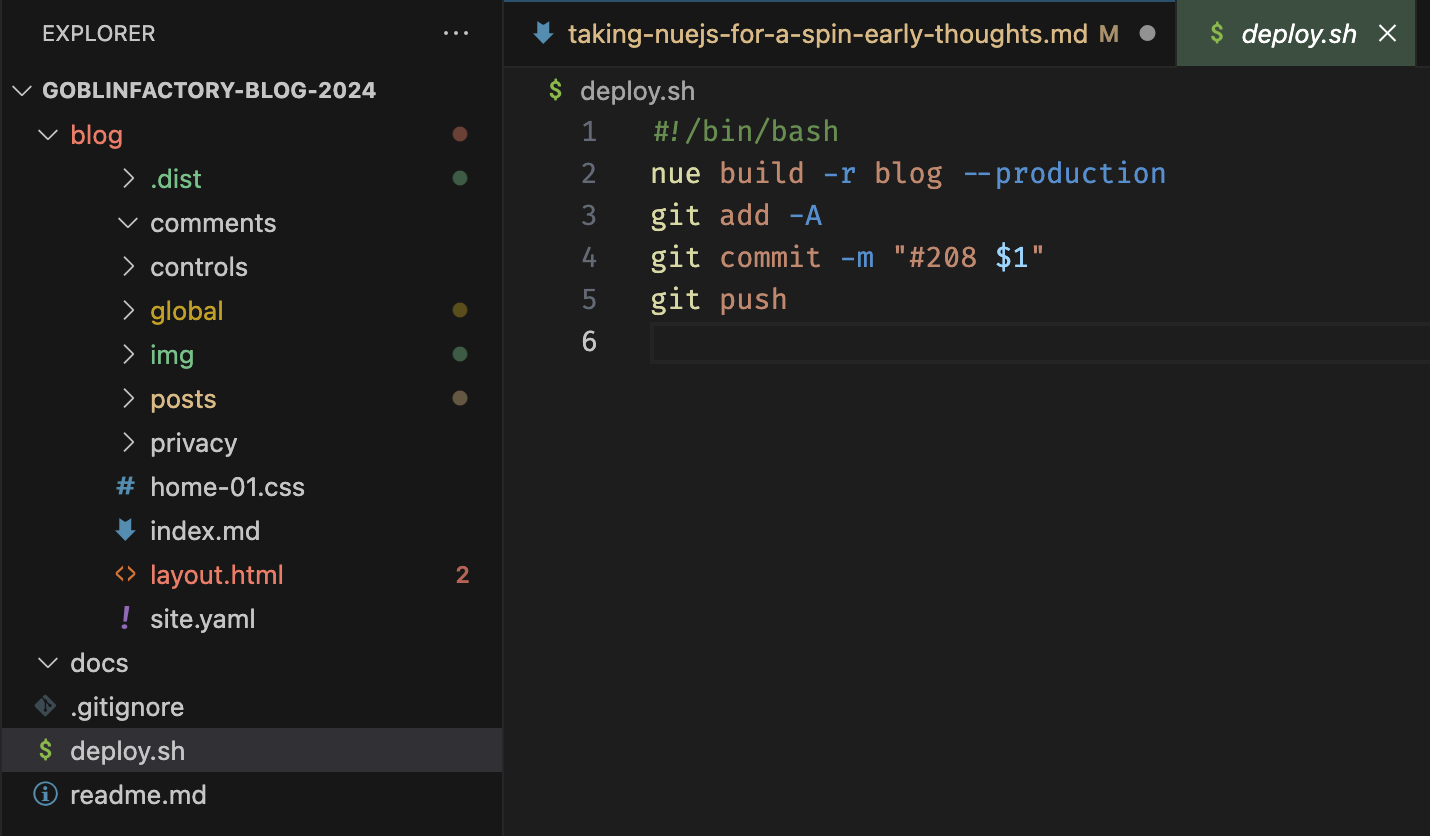
Hosting on cloudflare Pages couldnt have been simpler. See the screenshot above, that has the entire folder structure of my blog;
Setting up for the first time
Git init, and follow nue getting started guide to create your starter blog in a folder called X, in my case called
blog.Create a fake
makefilecalled deploy in the root of your project. Copy the idea from my deploy.sh, to create a deploy.sh for yourself.Add your git project to github.
Do not exclude the .dist folder. (edit your .gitignore if necessary)
The only important steps in the deploy.sh file is for the script to do a production build BEFORE committing (git push) to your repo. This will PUSH your latest build.
In your cloudflare dashboard, go to workers and pages
click
create an application
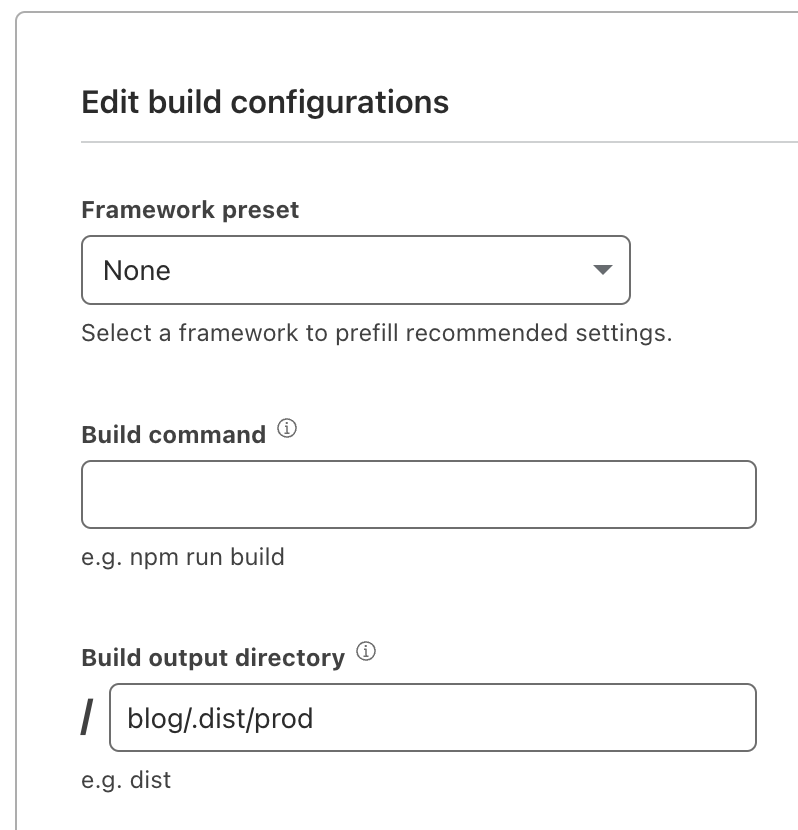
-> pick -> pages -> connect to git -> select your blog repo -> begin setupon the next screen, select -> (main branch) -> (framework preset = None) -> Build command (leave blank) -> Build output directory (blog.dist/prod)
click
save and deploy
Your build settings should now look like this
Create apage in your blog
When you're done, make sure you're in a terminal at the root, and run ./deploy
my new foo foo page
Wait about 5 to 10 seconds, and it will be live. I kid you not, it's that fast.
Yes, I know that's a no-no in normal development processes; but for now, it works really well since everything is just so trim and tiny. (If i was using nue to build an actual SPA application the I would not advise doing it this way, but for a blog, imo it's just too simply not to do it)
Consideration for production use
I consider the risk of adding Nuejs to Goblinfactory's approved list of tools, to be low; despite this clearing being a work in progress. (ymmv)
The risk of Goblinfactory losing the investment of time in learning Nue, in the event the project fails or is abandoned is proportional to the time spent delivering content vs writing controls.
Some questions I still have
Not entirely sure that I like multiple css files; Only because I think I've seen some caching issues with css files, and I'd prefer to have a single css file I can change the name of and do a poor man's cache busting. There's probably a bun bunding setting I've not seen. I'm sure I'll get there.
It's just something I think you need to be aware of, if you're using it for the first time.
I'd like to see a
pit of successs
here, where this is guaranteed to work, and you only change the bundling of css files if you know what you're doing.Need to see how Nue fits with htmx.org
What I have not test driven yet
Building single page applications, reactive islands and universal hot reloading.
I also have ignored the API; My use case I dont see me calling an API to render content; not yet. It does open up some very intreguing options, but I can't see myself using it to render user provided markdown content for security reasons. (Not now at least)
Marrying nue with htmx, as mentioned above.
Doing the build server side. (as mentioned further up) I've just been too lazy, because I've been having too much fun being super productive; that + at the start thought if I don't end up using Nue, then a build step was irellevant.
My favourite features
Markdown components
Nested Markdown
Detailed notes with demo screenshots coming. (tabs is described below)
Dev server is sometimes slow</strong>
Currently early version of nue (
✓ Nue 0.3.1 • Bun 1.0.22) runs very slow in dev mode, on OSX, M1 Mac (8Gb Ram), and hangs-sortof a bit about every half or or so.(I'll be working for a while and suddenly images won't be loading. ) and I just have to control+c, and re-launch, and press cmd+r to continue Wisywig editing.
When site is deployed to production, then obviously it runs at lightspeed, so this isn't in any way a bother for me, though I suspect it could put off some early adopters that might thing it's a problem.
Collections sorting appears not to work
As far as I can tell, collections are not sorted, though documentation states is supposed to be sorted by date.
I hacked a fix.
I'll document my workaround, shortly which is to sort the collection in the constructor. (That works fine for me.)
Update 18 Jan '24
Apparently if you store your dates in specific format, then collections will sort on
pubDate.Currently does not support a few other common date formats.
Time permitting, I want to submit a PR to allow support for a few other date formats together with tests. This will give me my first opportunity to contribute to the codebase.
Nuemark tables don't support normal content
fixed in commit d2215c7Commas (any yaml special chars,
:,etc) in tr cell throws a compile error or causes extra<td>'sto be injected, breaking tables.Also does not support standard yaml encoding tricks, i.e. yaml folded lines or using double quotes.
Workaround:: Remove commas. I replaced mine with hyphens
-. The problem is quite annoying because it means some content that really needs a comma in, because it's just normal english simply wont work.
Fast accurate replies from Nue devs
I've gotten quick actionable feedback to Nue issues I've raised on Github.
This entire blog website is built using nue, not just this particular blog-post, so my comments are based on my experience while building this site porting old content, and learning nuejs from scratch on the way.
Alternative platforms I looked at;
Astro, Hugo, nextjs, (todo, complete my list of alternatives I looked at using.) I also created an ADR (Architectural De)
Additional observations (after the review)
syntax highlighing coming soon!| Date | Notes |
|---|---|
| 21/01/24 | I'd drop a lot more hacks here, but I will wait for the ability to render nicely formatted fenced code blocks. then I can go mental with all sorts of ideas. For example; it's trivial to fix almost anything you find that you don't like, I created a `blog-list` to replace default table as a quick workaround to the comma creating new `TD`'s I mentioned further up. I'll share my very un-sexy but totally good-enough blog-table here when fenced code blocks are available. The table just above these two paragraphs is delivered using my hacked custom component. Some things will need to be fixed in the core lib though, like the post.url not ending with .html, and kicking off http 308. |
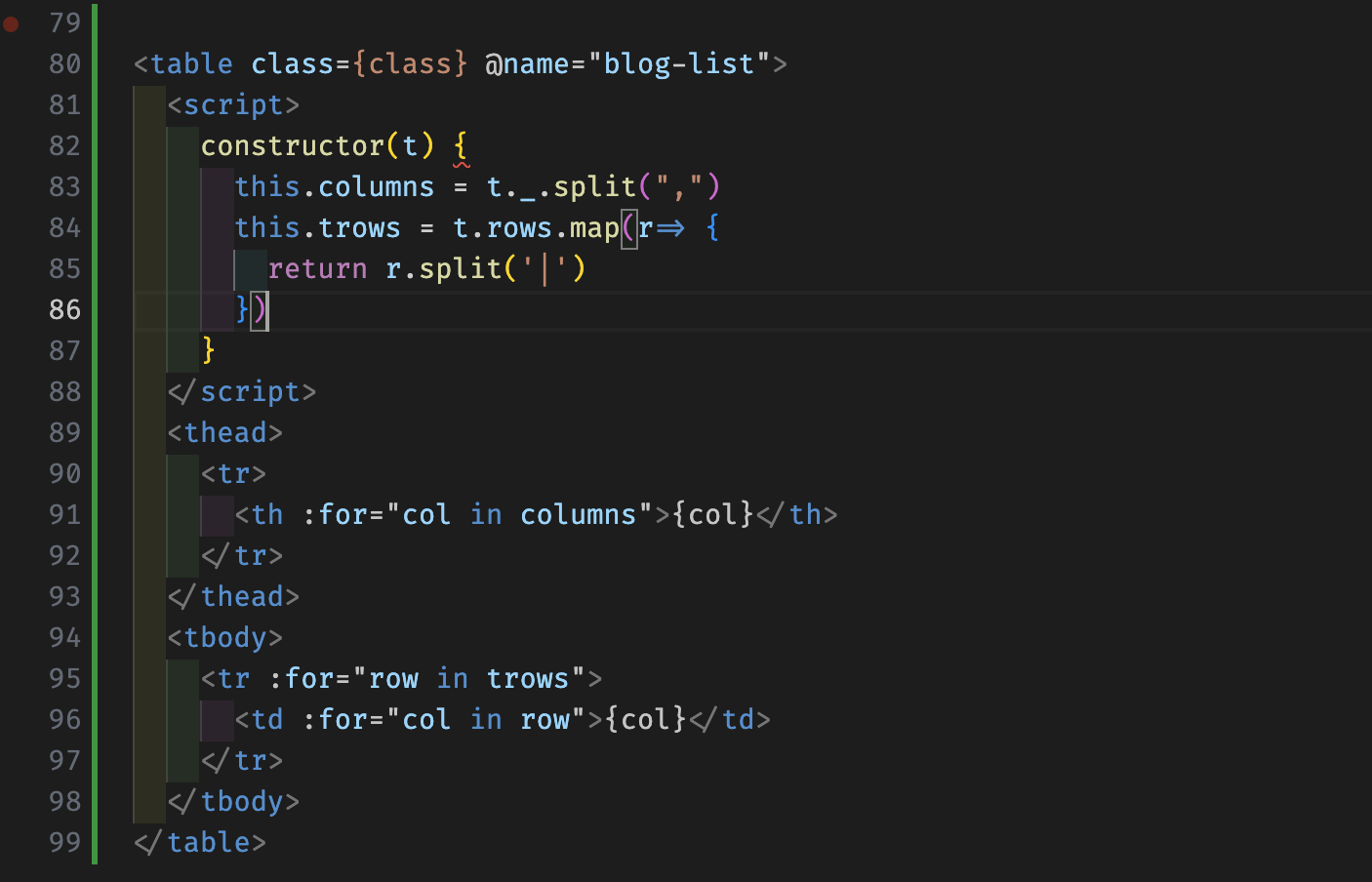
sane(easy to reason about and have a very low learning curve) Code above is the custom control to render the table just above.